.svg)

ChatGPT, Copilot, Claude, Gemini, Mistral… Your teams have almost certainly come across at least one of them. 😅
According to Bpifrance, more than one in two French SMEs say they already use generative AI, at least from time to time.
The question is which ones are really taking hold in companies.
We went through the studies and the announcements from large groups, and sorted it all out for you.
By the way: at AI Sisters, we are members of the Claude Partner Network. We train teams on Claude, and also on ChatGPT and Copilot. Let’s go 👇
In brief
- ChatGPT and Claude are the leading pair in the European companies tracked by Netskope, ahead of Gemini.
- Microsoft 365 Copilot is the choice of many large private groups, such as Publicis, AXA and Danone.
- In the United States, the company behind Claude has overtaken the company behind ChatGPT among paying businesses.
- In France, the State and the Caisse des Dépôts are betting on Mistral, the French option.
- Many employees still use a personal account: this is shadow AI, and it is a risk for your data.
- To equip your teams, start from the tools you already use: Google Workspace, Microsoft 365 or a standalone assistant.
Further reading
Explore our other articles to go further on AI in the workplace:
Most used AI tools in companies: the 5 to know
You don’t need to know every assistant on the market. In companies, five names come up again and again.
🔥 ChatGPT, from OpenAI. The star of the sector: it is the most widespread AI in European companies.
🔥 Claude, from Anthropic. The breakthrough of the year: according to Netskope, it is now the second most present AI in European companies. We explain what it changes for your teams.
🔥 Gemini, from Google. The AI in Gmail, Docs and Meet. If you are on Google Workspace, it is already included in your subscriptions.
🔥 Microsoft 365 Copilot, from Microsoft. The AI that lives in Word, Excel, Outlook and Teams, and that we teach people to use well at work. Microsoft claims more than 30 million paid licences.
🔥 Vibe, from Mistral AI. The French option, which you may know by its former name: Le Chat, renamed in August 2026.

Explore our AI training & book a call
Browse our training modules and choose, with us, the one that best meets your AI needs.
📚 See our AI training 📞 Book a discovery call
Claude, the second most present AI in companies according to Netskope
The rankings have shifted a lot in a year. 👀
Netskope, a security vendor, measures the actual use of AI in the European companies it protects. ChatGPT is still in the lead, but Claude is now second, ahead of Gemini.
Claude is used in nearly 8 out of 10 organisations. And it only really took off in autumn 2025.
The same trend shows in France among digital professionals: according to the Blog du Modérateur’s 2026 survey, Claude almost tripled in a year and climbed to second place, behind ChatGPT.
Among the general public, however, ChatGPT remains far ahead of all the others.

💡 In short: ChatGPT is still the default starting point, but Claude has earned a real place in European companies. Your teams may already have adopted it.
AI in companies: Anthropic ahead of OpenAI in the United States
🥊 Across the Atlantic, the race is tight.
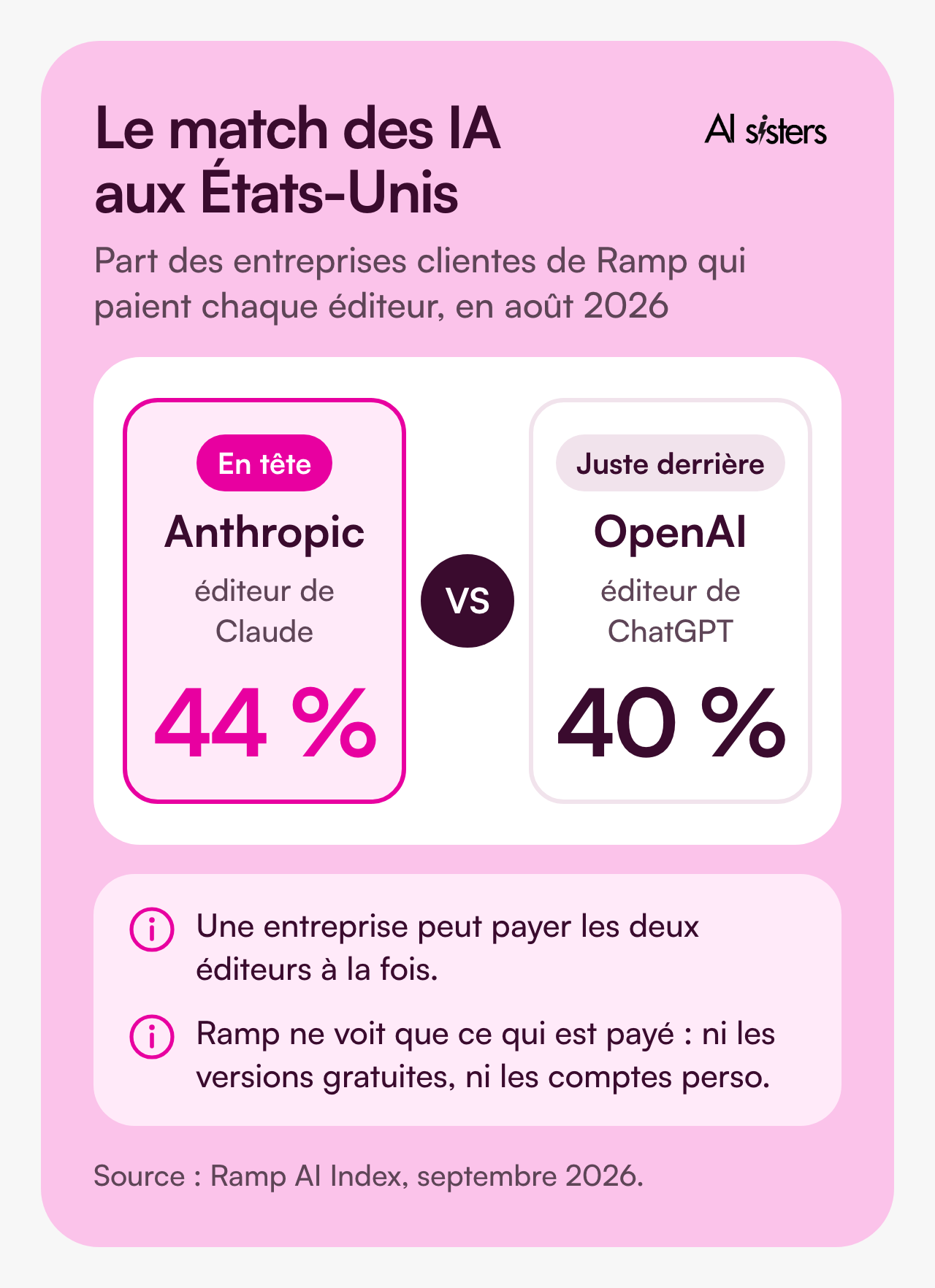
Ramp manages the cards and invoices of its client companies. So it sees their AI subscriptions go through.
In August 2026, more of them were paying Anthropic, the company behind Claude, than OpenAI.
Okta, which manages logins for thousands of organisations, has seen the same shift since March 2026.
And this race has no loser: most Okta customers already use several AI tools at the same time.
We already discussed this in our opinion piece published by Les Échos.
AI Sisters is a member of the Claude Partner Network
We train your teams on Claude and help you roll it out in your tools, from licences to the first use cases.
📚 Discover our Claude training 📞 Talk about your Claude project
AI in companies in France: who chose what?
And closer to home? We reviewed the announcements from large French groups. Here is who chose what.
💼 In large private groups, Microsoft 365 Copilot comes up often. Publicis, AXA, Danone and TotalEnergies have rolled it out, or are rolling it out, at scale.
🇫🇷 In the public sector, Mistral is popular. The State has opened an assistant developed with Mistral AI to all its civil servants.
And the Caisse des Dépôts group has signed up with the French company.
🔍 Google has its followers too: Valeo is equipping all its employees with Gemini.
🔧 Others are building their own tool. That is the case for Sanofi. Veolia, for its part, has connected its own to several AI models at once.

💡 In short: there is no single winner. The right choice depends mainly on the tools you already use and your data requirements.
AI in companies: what uses for each team?
In practice, what do teams do with these tools? Here are the most common uses, team by team.

For a finance team: upload a report, ask for an analysis of variances against budget, and get a summary ready for the leadership committee.
ChatGPT now works directly in Excel and Google Sheets.
For a sales team: prepare a client meeting, write a first draft of a proposal, then refine it with the team.
On a key account project, an AI agent cut proposal production from several days to under an hour.
For an HR team: write a job description, prepare a new starter’s onboarding plan, and answer recurring questions.
Copilot helps draft these documents in Word, and we cover other uses in our article on AI for HR departments.
For managers: summarise a meeting, sort the week’s emails, and prepare follow-ups.
Copilot does this in Teams and Outlook, and Claude arrived in Outlook in May 2026.
For a marketing team: adapt a campaign for each channel and create the presentation to go with it.
ChatGPT, Claude and Gemini can all produce a first draft, and we have written a complete guide to creating a PowerPoint with AI.
For a legal team: upload a contract and its amendments, then ask where the risky clauses are.
For this type of document, always use an enterprise licence, never a personal account.

And that is exactly what we see in training: teams adopt AI when they see it working on their own files 💡 That is the whole principle behind our role-based approach to training.
Book your 30-minute call now
A no-obligation conversation to build your AI training around your tools.
👉 Tell us about your AI project 👈
Shadow AI: the risk of personal accounts
A scene you may recognise.
An employee needs to summarise a client offer. They open ChatGPT on their personal account, paste in the document… and get their summary in seconds.
Handy. But the document has just left the company, with no contract or usage rules. And nobody knows. 😅
This is what is called shadow AI.
Netskope, a security vendor, measured it in the companies it protects. The result: nearly one in two generative AI users still goes through a personal account.

💡 In short: if you don’t provide a tool, your teams will use their own. An official tool and simple rules limit the risk.
It is also a compliance issue. The European AI regulation requires companies to take measures to develop their teams’ AI skills.
We set out the method, step by step, in our guide to integrating AI into a company.
Book your 30-minute call now
A no-obligation conversation to build your AI training around your tools.
👉 Tell us about your AI project 👈
Team or Enterprise: which AI licence should you choose?
Want to equip your teams? Start by looking at what you already have.
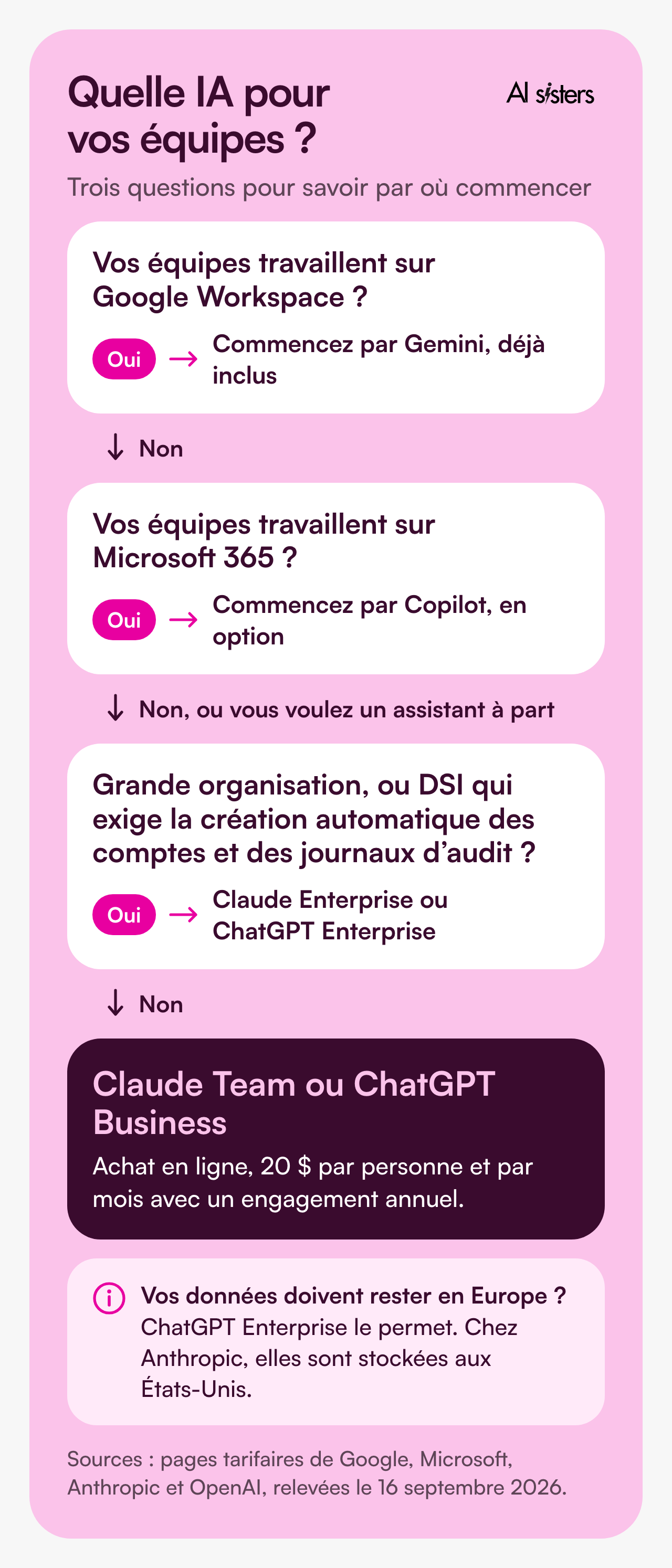
✅ Are you on Google Workspace? Gemini is included in your subscriptions.
✅ Are you on Microsoft 365? Copilot can be added as an option, or comes in a plan that includes it.
✅ Want a standalone assistant? Claude and ChatGPT offer two tiers.
The Claude Team and ChatGPT Business plans can be bought online. Expect $20 per person per month, with an annual commitment.
And by default, your data is not used to train the models.
The Enterprise plans are aimed at large organisations. They add what your IT department will ask for: automatic account provisioning, audit logs, role-based permissions.
🚨 One point to check: where your data is stored.
ChatGPT Enterprise lets you keep it in Europe. OpenAI is gradually extending this option to ChatGPT Business. At Anthropic, it is stored in the United States.
Still unsure which assistant to pick? We compared Claude, ChatGPT and Gemini for a company in a previous article.
Book your 30-minute call now
A no-obligation conversation to build your AI training around your tools.
👉 Tell us about your AI project 👈
Key takeaways
- Five AI tools come up everywhere in companies: ChatGPT, Microsoft 365 Copilot, Claude, Gemini and Mistral’s Vibe.
- ChatGPT is still the most widespread, but Claude is now second in the European companies tracked by Netskope, and the company behind it has taken the lead among paying US businesses.
- In France, large private groups often choose Copilot, while the public sector tends to bet on Mistral.
- Your employees may already be using AI with their personal accounts: offer them an official tool.
- To choose, start from the tools you already use and your data requirements.
- Start small: two or three simple uses, one official tool, and training on your real work.
Sources
- Netskope, Threat Labs Report Europe 2026, data from March 2025 to March 2026.
- Blog du Modérateur and SocIAty, the AI tools most used by digital professionals in 2026, 22 June 2026.
- Bpifrance Le Lab, 82nd barometer of French small and medium-sized businesses, 13 January 2026.
- Microsoft, fourth-quarter 2026 results, 29 July 2026.
- Ramp, AI Index, 9 September 2026.
- Okta, Enterprise AI Index, 16 July 2026.
- Mistral AI, Le Chat is now Vibe, 12 August 2026.
- Publicis Groupe and Microsoft, press release, 8 April 2026.
- AXA, roll-out of Microsoft 365 Copilot, 20 July 2026.
- Microsoft, case studies Danone and TotalEnergies, 24 October 2025.
- DINUM, general roll-out of the State AI Assistant, 16 June 2026.
- Caisse des Dépôts group, commitment with Mistral AI, 4 May 2026.
- Valeo, Gemini for Google Workspace, 22 April 2026.
- Fortune, Sanofi’s Concierge assistant, 27 May 2026.
- LeMagIT, Secure GPT at Veolia, 20 May 2025.
- Netskope, Cloud and Threat Report 2026, reported by Cybersecurity Dive, 6 January 2026.
- European regulation on artificial intelligence, Article 4, as of 27 July 2026.
- Data storage: OpenAI and Anthropic.
- Prices checked on 16 September 2026: Claude, ChatGPT, Google Workspace and Microsoft 365 Copilot.



.avif)
