.svg)

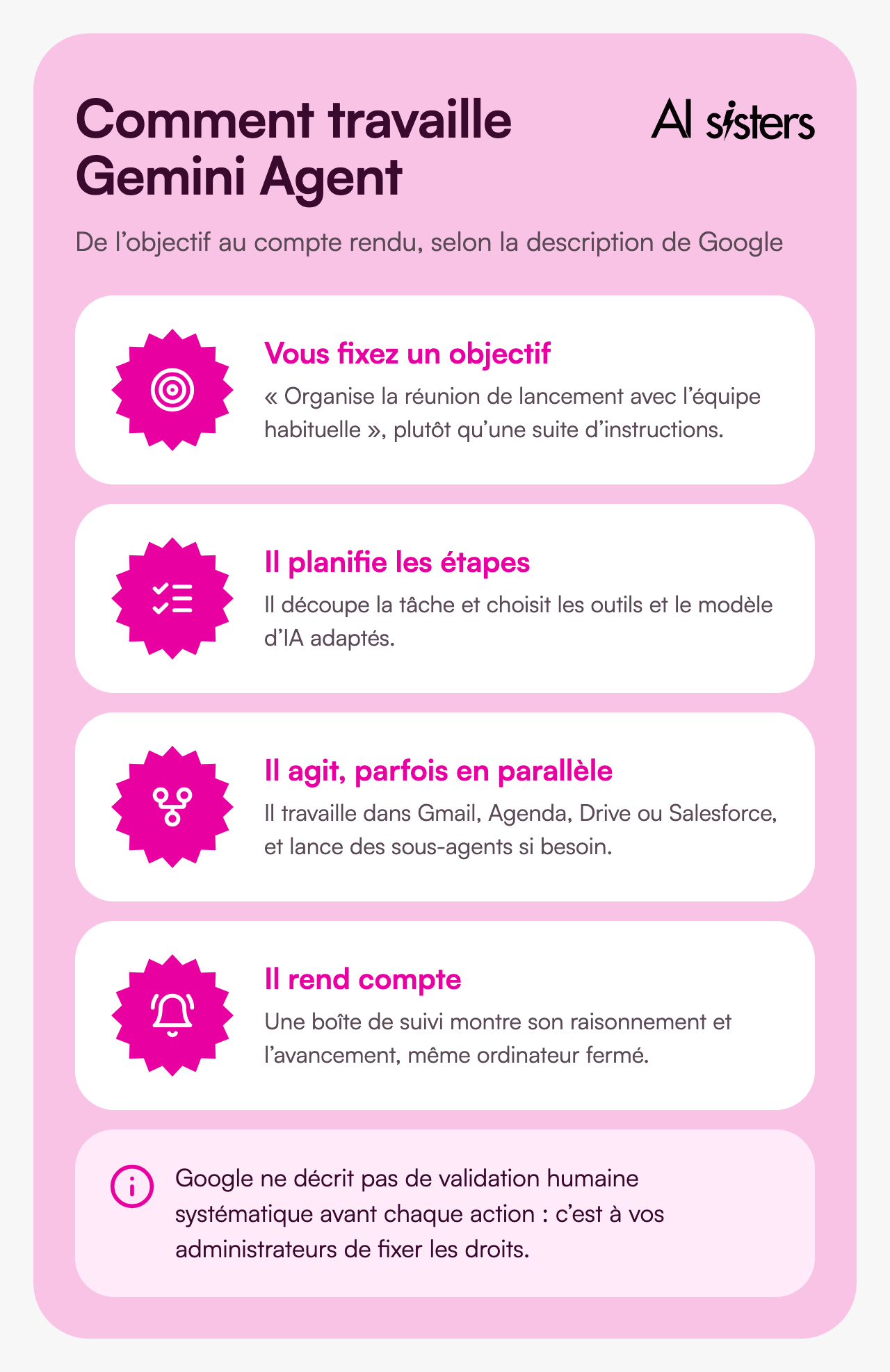
On 8 October 2026, Google Cloud unveiled Gemini Agent, a single agent for work in companies. You no longer give it instructions one by one: you hand it a goal, and it organises itself to reach it in Gmail, Docs, Sheets or Salesforce, sometimes over several days.
The ambition is real. But as of 12 October, the agent is open to only a handful of customers, with no price and no date, and nothing yet says when it will arrive in France. 😅
At AI Sisters, we train teams to work with AI, tool by tool and role by role. Here is what Gemini Agent really does, what remains unclear, and how to prepare your teams now. Let’s go 👇
“You give the agent goals, not just instructions,” summed up Thomas Kurian, CEO of Google Cloud, at the launch.
In brief
- Announced on 8 October 2026 by Google Cloud, Gemini Agent brings conversation, autonomous tasks and coding together in a single window.
- It works alone and for a long time: the task carries on in the cloud with your computer closed, with sub-agents running in parallel.
- It acts in your tools: Gmail, Docs, Sheets, Calendar, but also Salesforce, SAP, Slack or Microsoft 365.
- “Coworker agents” make their debut, with their own email address, calendar and name in the company directory.
- It is not available yet: private preview, no published price, no firm date, nothing on France.
- Preparation, however, starts now: choosing the tasks to delegate, framing the data, training the teams.
What exactly is Gemini Agent?
Gemini Agent works on a different logic: it receives a goal and chains the steps together itself to reach it.
Google describes it as “a universal agent for work”. It is available on the web, on mobile, on Windows and Mac, and directly in Workspace with the @Gemini mention. It also works in Slack and Microsoft 365.
| Capability | In practice | What you need to know |
|---|---|---|
| Receive a goal | You describe the expected result, the agent plans the steps | No systematic human approval described by Google |
| Work for a long time | The task carries on in the cloud, computer closed, for hours or days | A spending cap can pause the task |
| Multiply itself | It creates temporary sub-agents that work in parallel | Their cost is not published |
| Act in Workspace | Gmail, Drive, Docs, Sheets, Slides, Chat, Calendar, called with @Gemini | It sees whatever your access rights open up to it |
| Connect to your tools | Salesforce, ServiceNow, Workday, SAP, Jira, Slack, Microsoft 365, BigQuery… | Each connection is approved by your administrators |
| Remember | Memory of the session, your preferences and the procedures it learns | The retention period is not specified |
Google’s example: you ask it to organise a meeting with “the usual team”. The agent identifies the participants from your past conversations and meetings, checks calendars, suggests a slot and writes to the external guests.
💡 In plain terms: assistant or agent. An assistant is a satnav that tells you the way: you drive. An agent is a driver you give the address to: it chooses the route, stops for fuel and lets you know when you arrive.
On models, Google says the agent chooses “the most suitable model” for each task, from the Gemini family and Anthropic’s Claude models. The default model is not specified. Gemini 4 Argon, covered in our article, remains in restricted access.
“Coworker agents”, the real novelty
The newest part of the announcement is the permanent agents, which Google calls “coworker agents”. Each one has a role, an email address, a Workspace account, a calendar, a Drive space and an entry in the company directory.
In practice, you can add a “supplier follow-up” agent to a Chat space, mention it in a Google Docs comment, and find its edits under its name in the version history.
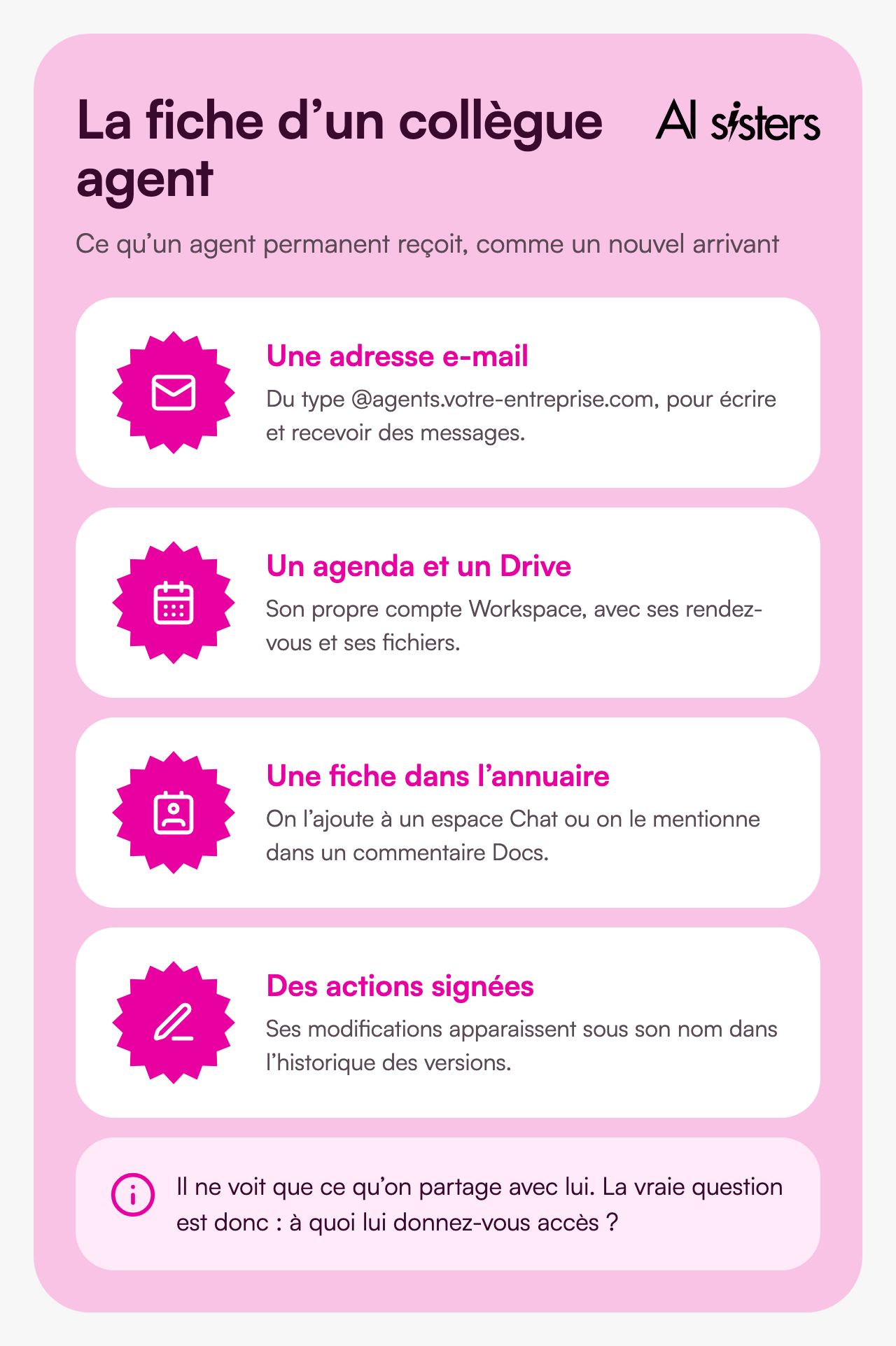
💡 In plain terms: an agent with an email address. It is like welcoming a very fast intern: they have their badge, mailbox and access, they work on the files you hand them, and everything they do is signed with their name.
⚠️ What Google is not saying yet. VentureBeat notes that Google has not confirmed whether all agents get a mailbox or only permanent agents. The cost of running dozens of agents continuously remains unknown.
Availability, pricing, France: what we know and what we don’t
This is where the announcement parts ways with reality. Gemini Agent has been presented, but is not on sale yet.
| Question | What we know | Source |
|---|---|---|
| Can it be used today? | No, except by a selection of customers in private preview | Google, CIO Dive |
| When will it be available? | “Soon”, according to Google. Late October or early November, according to executives quoted by Constellation Research | A single source, to be confirmed |
| How much does it cost? | No published pricing. “At no extra cost” for Gemini Enterprise customers, according to a spokesperson quoted by VentureBeat | Usage-based billing mentioned by Constellation |
| With which subscription? | Some Business and Enterprise plans, with no precise list | 9to5Google |
| Available in France? | No source says so, either way | Not confirmed |
| With which AI model? | Gemini models and Anthropic’s (Claude), chosen according to the task |
To keep control of the bill, Google provides a spending cap per project, set by the administrator. When it is reached, the agent pauses until someone restarts it with a click.
Be careful not to confuse it with Google’s consumer agent, Gemini Spark.
| Gemini Agent | Gemini Spark | |
|---|---|---|
| For whom | Companies, business accounts | Individuals, AI Pro or Ultra subscribers |
| Status | Private preview, announced on 8 October 2026 | Experimental, launched in May 2026 |
| In France | Not specified | Excluded from the European Economic Area |
| Confirmation before acting | Not described in general terms | Yes: sending messages, purchases, forms, editing shared documents |
Discover our AI training & book a call
Prepare your teams to work with agents, on their real tasks.
📚 See our AI training📞 Book a discovery call
What it could change for three roles
Google cites many customers, including BNP Paribas. But Futurum and VentureBeat note that most of these results come from earlier Gemini Enterprise deployments, not from the new agent. The figures are Google’s, with no independent measurement.
| Company | Use | Announced result |
|---|---|---|
| Commerzbank | Document review | From 20 hours to 1 hour |
| Bradesco | Document review | From one hour to 5 minutes |
| Nokia | Incident resolution | Up to 80% less time |
| BNP Paribas | Internal assistant for more than 65,000 employees (credit memos) | No productivity figures |
| Orange Spain | Building custom agents | More than 1,000 agents |

For a finance team: preparing the files, not making the decision.
Google is launching in preview a specialised version with more than 50 business skills and data from FactSet, LSEG and S&P Global. First task to delegate: summarising an annual report, with figures checked one by one. Watch out: an agent that reads your financial data must have rights limited to the strict minimum.
For a legal team: research and review, not signing.
The legal version, also in preview, mirrors the access rights and ethical walls of law firms’ document tools, such as NetDocuments and iManage. First task to delegate: gathering the clauses of one contract type on a closed matter. Watch out: an agent’s mistake on a shared document commits the team, hence the value of starting with read-only tasks.
For operations and customer service: tasks that span several tools.
A request arrives by email, the agent checks the record in the CRM, prepares a reply and schedules a callback. First task to delegate: sorting incoming requests, with a person approving the replies. Watch out: long, multi-tool tasks are precisely the ones whose reliability has not yet been independently measured.
Security and data: the questions to ask before you start
Google highlights several safeguards, but some answers are still missing.
✅ What Google provides. Each agent has a verified identity and access kept to a minimum. Connections to external tools are approved by your administrators, and every action is logged under the agent’s name. According to Google, Workspace does not use your data to train its models without your permission.
⚠️ What still needs clarifying. Google has not said what happens to your data when a task is handed to a Claude model. The Gemini Enterprise documentation provides for hosting in the European Union, but not for every feature or every model. And earlier versions of Gemini have already been tricked by instructions hidden in emails or calendar invitations.
In July 2026, the CNIL (the French data protection authority) published a note on agentic AI with the CIANum. It recommends access limited to the strict minimum, real-time monitoring and human approval for important decisions.
How to prepare your teams now
Gemini Agent is not available yet, but the companies that benefit from it fastest will be those that have prepared the ground. Here are five steps, useful whichever agent you choose.
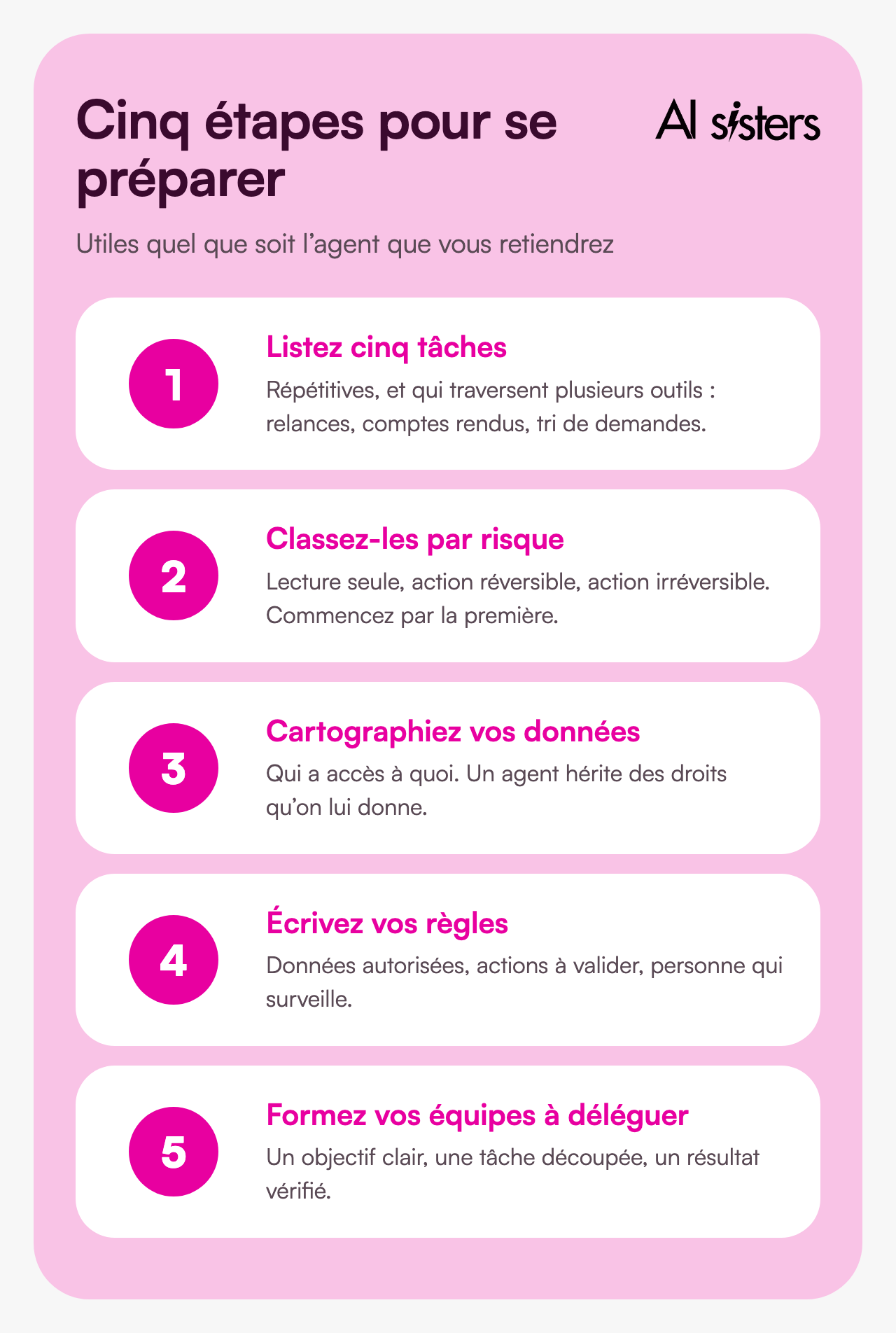
- List five repetitive tasks that span several tools: follow-ups, meeting notes, sorting requests, preparing meetings.
- Rank them by level of risk: read-only, reversible action, irreversible action. Always start with the first category.
- Map your data: who has access to what in Drive and in your business tools. An agent inherits the rights it is given.
- Write your rules: which data can be entrusted to an agent, which actions require human approval, who monitors. Our guide to integrating AI into a company sets out this approach in detail.
- Train your teams to delegate: setting a clear goal, breaking down a task, checking a result. It is at the heart of our role-based approach to training.
Already on Workspace? Ask your Google contact whether your plan will be included, and where your data will be processed.
Book your 30-minute call
A no-obligation conversation to build your AI roadmap.
👉 Tell us about your AI project 👈
Key takeaways
- Gemini Agent moves from assistant to agent: you hand it a goal, and it chains the steps together in your tools.
- Coworker agents are the real novelty, with their own account, calendar and signed actions.
- It is not available yet: private preview, no price, no firm date, no commitment on France.
- The customer results cited are Google’s, and most concern earlier tools.
- Prepare now: tasks to delegate, written rules, trained teams.
Sources
- Google Cloud, Welcome to Gemini at Work 2026: Introducing the Gemini agent, 8 October 2026.
- Google, Gemini at Work, 8 October 2026.
- TechCrunch, Google brings agentic AI to Gemini, starting with businesses, 8 October 2026.
- VentureBeat, Google Cloud unveils persistent Gemini agents, 8 October 2026.
- CIO Dive, Google’s Gemini agent and Thomas Kurian, 8 October 2026.
- 9to5Google, Gemini agent for Google Cloud, 8 October 2026.
- Constellation Research, Google Cloud launches Gemini agent, 8 October 2026.
- Futurum, Google collapses enterprise AI into a single Gemini agent, 9 October 2026.
- Blog du Modérateur, Google lance un agent Gemini unique pour le travail, 9 October 2026.
- Google, Gemini Spark help, accessed 12 October 2026.
- Google Cloud, Gemini Enterprise, data locations, accessed 12 October 2026.
- Google, generative AI privacy in Workspace, accessed 12 October 2026.
- CNIL and CIANum, IA agentique et protection des données personnelles, July 2026.




.avif)
